


Best Embroidery Machine for Beginners in 2026: 5 Easy Machines to Start With

Starting machine embroidery can feel overwhelming. There are hoop sizes, embroidery files, stabilizers, bobbins, thread tension, and dozens of machine features to understand.
The good news is that you do not need the most expensive machine to get started. The best embroidery machine for beginners should be easy to thread, simple to operate, reliable, and capable of producing clean embroidery without a complicated setup.
For most beginner hobbyists, the Brother SE700 is the best embroidery machine for beginners because it combines sewing and embroidery functions, beginner-friendly controls, wireless design transfer, and a manageable 4-by-4-inch embroidery area.
However, it is not the right choice for everyone. Some beginners may prefer a dedicated embroidery-only machine, while others may benefit from a larger hoop or a more extensive built-in design library.
This guide from Apex Embroidery Designs compares five beginner-friendly embroidery machines and explains which features matter most when choosing your first machine.
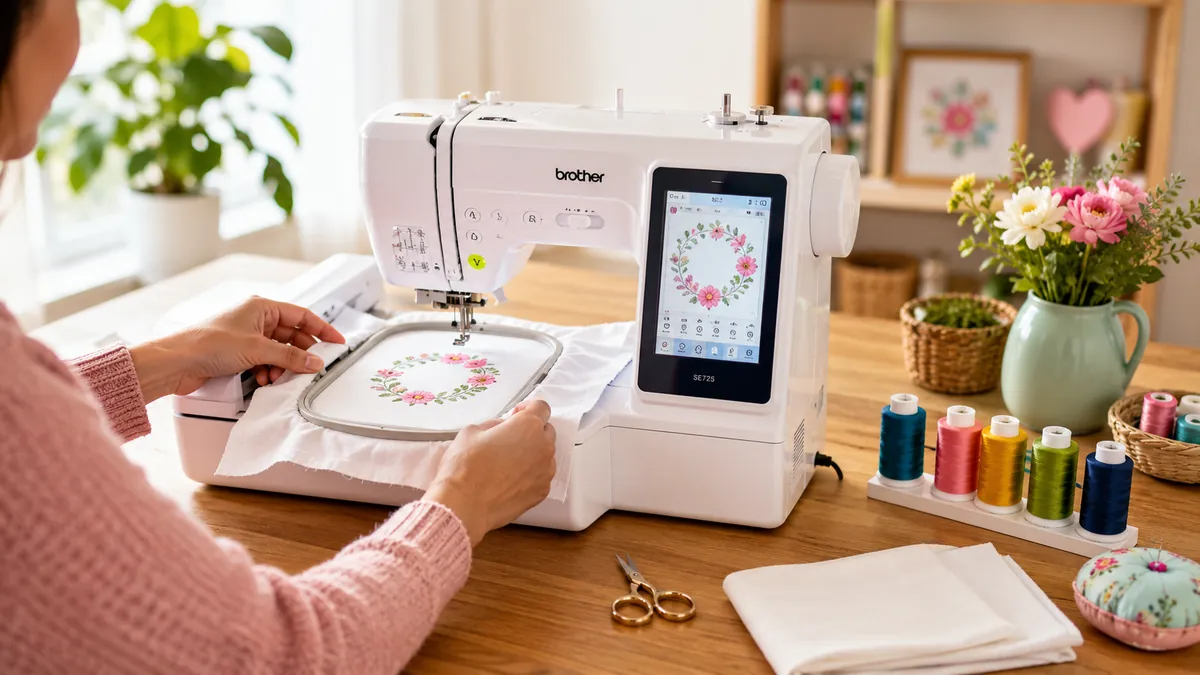
Quick Comparison: Best Beginner Embroidery Machines
| Machine | Best For | Embroidery Area | Machine Type | Built-In Designs |
|---|---|---|---|---|
| Brother SE700 | Best overall | 4" x 4" | Sewing and embroidery | 135 |
| Brother PE545 | Best embroidery-only starter | 4" x 4" | Embroidery only | 135 |
| Brother PE900 | Best for a larger hoop | 5" x 7" | Embroidery only | 193 |
| Janome Memory Craft 100E | Best built-in design library | 5.5" x 5.5" | Embroidery only | 274 |
| Brother SE2000 | Best premium combination machine | 5" x 7" | Sewing and embroidery | 193 |
1. Brother SE700: Best Overall Embroidery Machine for Beginners
The Brother SE700 is our top embroidery machine for beginners who want to learn both sewing and machine embroidery.
It is a combination machine, meaning you can use it for regular sewing projects as well as embroidery. This makes it especially suitable for hobbyists who want to make clothing, tote bags, pillow covers, gifts, and personalized home décor without buying two separate machines.
The SE700 includes a 4-by-4-inch embroidery hoop, a color display, built-in embroidery designs, lettering fonts, and wireless connectivity. Brother describes the machine as an entry point for people beginning their sewing and embroidery journey. Its wireless LAN connection allows users to transfer compatible embroidery files from a computer through Brother’s Design Database Transfer software.
What We Like
- Combines sewing and embroidery in one machine
- Easy-to-navigate color display
- Automatic needle threader and thread cutter
- Wireless embroidery design transfer
- Large selection of sewing stitches and embroidery designs
- Strong availability of tutorials, accessories, and compatible hoops
What Could Be Better
- The 4-by-4-inch embroidery area may feel limiting later
- You must switch between sewing and embroidery setups
- Larger designs may need to be split or re-hooped
Who Should Buy It?
Choose the Brother SE700 if you are completely new to sewing and embroidery and want one versatile machine for both hobbies.
2. Brother PE545: Best Embroidery-Only Machine for Beginners
If you only want to embroider, the Brother PE545 is one of the best beginner embroidery machines to consider.
Unlike the SE700, the PE545 is dedicated entirely to embroidery. It does not perform regular sewing stitches. For someone focused on monograms, towels, shirts, bags, patches, and personalized gifts, that simpler workflow can be an advantage.
The PE545 has a 4" x 4" embroidery field, 135 built-in designs, 10 lettering fonts, a 3.7-inch LCD screen, automatic needle threading, automatic thread cutting, and embroidery speeds of up to 400 stitches per minute.
What We Like
- Simple embroidery-only workflow
- Beginner-friendly touchscreen
- Automatic needle threading
- Automatic thread cutting
- Built-in lettering options
- Good for monograms and smaller designs
What Could Be Better
- Cannot perform regular sewing
- Limited to a 4" x 4" embroidery field
- Not designed for large embroidery projects
Who Should Buy It?
The PE545 is a good embroidery machine for beginners who already own a sewing machine or have no interest in regular sewing.
If your main goal is personalizing towels, clothing, bags, and gifts, it provides a straightforward introduction to machine embroidery.
3. Brother PE900: Best Beginner Machine With a Larger Hoop
One of the most common reasons people outgrow a beginner embroidery machine is hoop size.
A 4-by-4-inch field is sufficient for names, small characters, chest logos, baby items, and simple decorative designs. However, it can become restrictive when you want to embroider larger shirt designs, tote bag graphics, quilt blocks, or more detailed compositions.
The Brother PE900 provides a 5-by-7-inch maximum embroidery area, 193 built-in designs, wireless LAN connectivity, and a 3.7-inch LCD display.
The larger field gives beginners more room to experiment while reducing the need to split designs or reposition fabric.
What We Like
- Larger 5-by-7-inch embroidery field
- Dedicated embroidery-only operation
- Wireless design transfer
- Extensive built-in design library
- Better long-term flexibility than most 4-by-4-inch machines
What Could Be Better
- Higher purchase price than entry-level models
- Does not include regular sewing functions
- Requires more workspace than compact 4-by-4-inch machines
Who Should Buy It?
Choose the PE900 if you are serious about embroidery and would rather invest in a larger hoop now than upgrade after a year or two.
4. Janome Memory Craft 100E: Best Built-In Design Library
The Janome Memory Craft 100E is a dedicated embroidery machine with a generous selection of built-in designs.
It includes 274 embroidery designs, 11 fonts, monogramming functions, automatic thread cutting, thread-break recovery, and on-screen editing tools. Its maximum embroidery area is approximately 5.5 by 5.5 inches, and its editing functions include resizing, rotating, combining, duplicating, flipping, grouping, and zooming.
The square embroidery field is particularly useful for quilt blocks, decorative patches, framed designs, and centered motifs.
What We Like
- 274 built-in embroidery designs
- 11 monogramming fonts
- Larger field than standard 4-by-4-inch machines
- Useful on-screen editing functions
- Automatic thread cutter
- Thread-break detection and recovery features
What Could Be Better
- Embroidery-only machine
- Smaller online tutorial ecosystem than Brother
- Uses Janome-compatible embroidery formats, so file compatibility should be checked before downloading designs
Who Should Buy It?
The Memory Craft 100E is ideal for beginners who want many built-in creative options and prefer not to purchase or download designs immediately.
5. Brother SE2000: Best Premium Beginner Combination Machine
The Brother SE2000 is a more advanced alternative to the SE700.
It offers both sewing and embroidery, but upgrades the embroidery field from 4 by 4 inches to 5 by 7 inches. It also includes 193 built-in embroidery designs and 241 built-in sewing stitches.
This machine costs considerably more than a typical entry-level model, but it may offer better long-term value for hobbyists who expect to make larger projects and continue developing both sewing and embroidery skills.
What We Like
- Sewing and embroidery in one machine
- Larger 5-by-7-inch embroidery field
- Extensive stitch and design libraries
- Suitable for beginners and more experienced hobbyists
- Reduces the need for an early upgrade
What Could Be Better
- Expensive for a first machine
- More features mean a steeper initial learning curve
- May be excessive for occasional monogramming
Who Should Buy It?
Choose the SE2000 if you have a flexible budget and want a machine that can support your hobby well beyond the beginner stage.
How to Choose an Embroidery Machine for Beginners
The best beginner embroidery machine is not necessarily the model with the most stitches, designs, or accessories. The right machine is the one that fits the projects you actually want to make.
Consider the following factors before purchasing.
Embroidery-Only vs. Combination Machine
An embroidery-only machine is designed specifically for machine embroidery. It cannot construct garments, sew seams, or perform standard utility stitches.
A combination machine includes both sewing and embroidery functions.
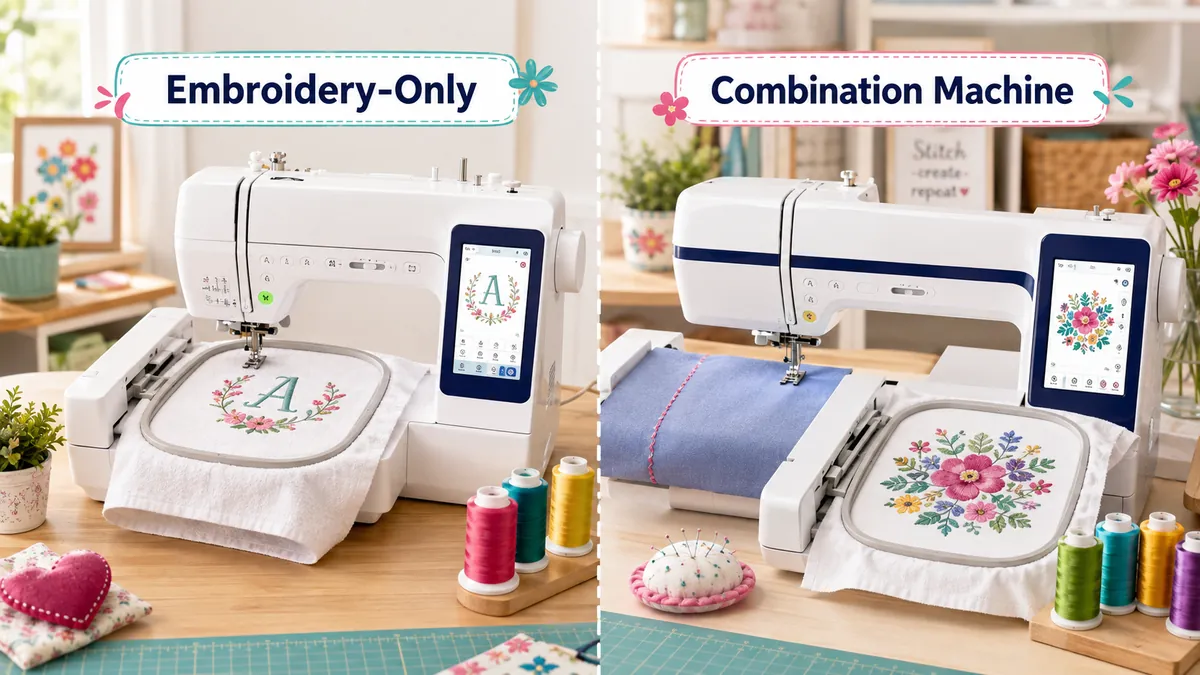
Choose an embroidery-only model when:
- You already own a sewing machine
- You are primarily interested in monograms and decorative designs
- You want a simpler embroidery-focused workflow
Choose a combination model when:
- You are also learning to sew
- You have limited storage space
- You want to complete an entire project on one machine
For most completely new hobbyists, a combination machine such as the Brother SE700 offers greater versatility.
Hoop Size
Hoop size determines the largest design area the machine can embroider without repositioning the fabric.
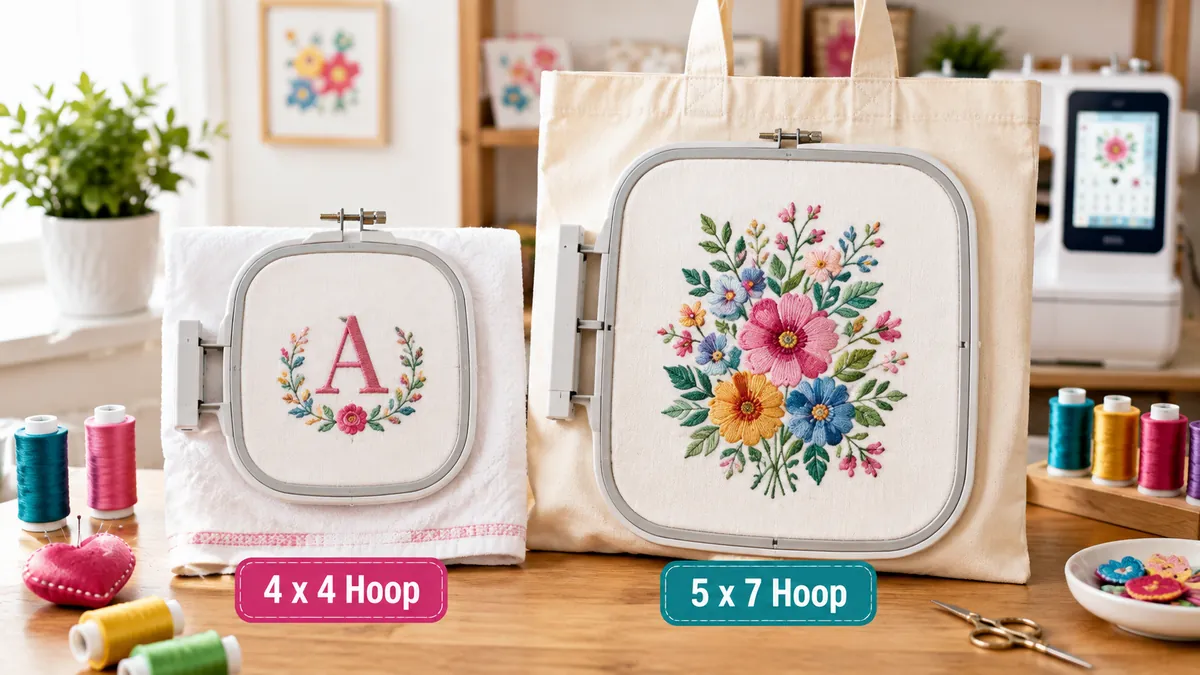
A 4-by-4-inch field is suitable for:
- Names and monograms
- Children’s clothing
- Small patches
- Chest logos
- Towels
- Small decorative motifs
A 5-by-7-inch field is better for:
- Tote bag designs
- Larger shirt graphics
- Quilt blocks
- Detailed compositions
- Multiple design elements
A 4-by-4-inch machine is easier on the budget, but a 5-by-7-inch model provides more room to grow.
Screen and Design Editing
A color screen makes it easier to preview designs, change thread colors, rotate patterns, resize elements, and confirm placement.
Beginners should look for controls that allow them to:
- Preview the design
- Rotate and reposition it
- Adjust the size
- Review the color sequence
- Move forward or backward through stitches after a thread break
Advanced editing software is useful later, but basic on-machine editing is enough for most first projects.
Design Transfer
Embroidery machines generally accept new designs through USB storage, a direct computer connection, or wireless transfer.
Wireless transfer is convenient, but it is not essential. USB transfer can be just as reliable and may involve fewer connectivity issues.
Before downloading a design, confirm that:
- The file format is compatible with your machine.
- The design fits inside your machine’s maximum embroidery field.
- The stitch count and density are appropriate for your fabric.
- The design is intended for machine embroidery rather than printing or cutting.
Beginners can browse the complete machine embroidery design library or start with the Free Embroidery Designs Bundle before purchasing additional files.
Automatic Features
Automatic features reduce frustration and help beginners achieve more consistent results.
The most valuable ones include:
- Automatic needle threading
- Automatic thread cutting
- Bobbin thread monitoring
- Thread-break detection
- On-screen threading instructions
- Design tracing or boundary preview
These features do not replace proper preparation, but they make the learning process smoother.
Accessories and Support
A popular machine often has more compatible hoops, replacement parts, tutorials, troubleshooting guides, and online communities.
Brother and Janome both provide product manuals and support resources for their current embroidery machines. Brother also maintains dedicated support pages for models such as the SE700 and PE545.
For a beginner, easy access to help can be more valuable than an extra hundred built-in designs.
What Do Beginners Need for Machine Embroidery?
After choosing the best embroidery machine for beginners, you will need a few basic supplies
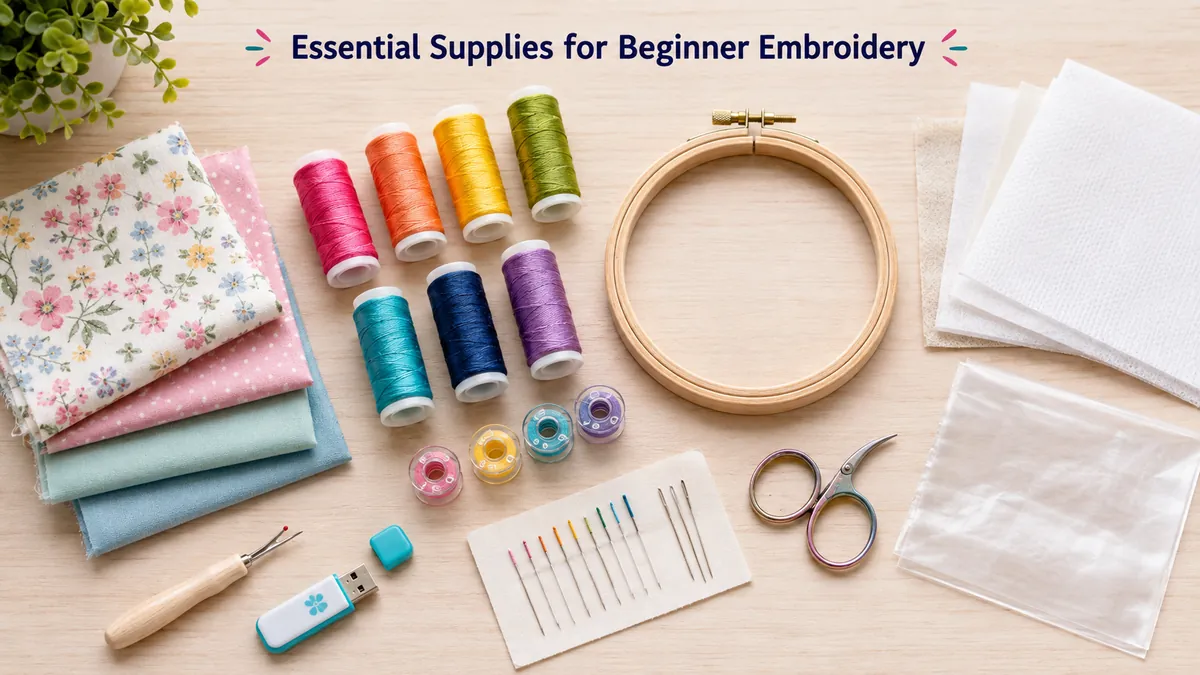
Embroidery Thread
Machine embroidery thread is designed to create smooth, decorative stitches. Polyester thread is a practical starting choice because it is strong, colorfast, and widely available.
Bobbin Thread
Embroidery bobbin thread is usually lighter than the decorative top thread. Pre-wound bobbins can save time, but they must be compatible with your machine.
Stabilizer
Stabilizer supports the fabric while the machine forms thousands of stitches.
Common types include:
- Tear-away stabilizer for stable woven fabrics
- Cut-away stabilizer for stretchy garments
- Wash-away stabilizer for lace or delicate projects
- Water-soluble topping for towels and textured fabrics
Using the wrong stabilizer is one of the fastest ways to produce puckering, shifting, or uneven stitches.
Embroidery Needles
Use needles that match the fabric, thread, and design density. Replace the needle when it becomes bent, damaged, or dull.
Small Scissors
Curved embroidery scissors are useful for trimming thread tails and jump stitches close to the fabric.
Beginner-Friendly Embroidery Designs to Try First
Your first projects should use clear shapes, moderate stitch counts, and limited color changes.
Avoid extremely dense designs, tiny lettering, and complicated multi-position embroidery until you are comfortable with hooping, stabilizer selection, and thread management.
Easy beginner projects include:
- Monogrammed towels
- Tote bags
- Baby items
- Small patches
- Pillowcases
- Simple shirt designs
- Fabric gifts
You can browse more than 800 lettering options in the Apex embroidery font collection or explore appliqué embroidery designs when you are ready to try a different embroidery technique.
If you want to create personalized lettering projects, see our guide on how to embroider monograms.
Common Beginner Mistakes to Avoid
Hooping the Fabric Too Loosely
The fabric should be secure and flat in the hoop. It should not sag, shift, or become distorted.
Skipping the Stabilizer
Even sturdy fabric may need stabilizer. Dense embroidery can pull fabric inward and create puckering.
Using an Oversized Design
A design must fit within the machine’s embroidery field. Buying a larger physical hoop does not automatically increase the maximum area the machine can stitch.
Choosing Designs That Are Too Dense
Highly detailed designs can be difficult on thin or stretchy fabric. Start with simple motifs that have moderate stitch counts.
Leaving the Machine Unattended
Stay nearby during stitching, especially while learning. Thread can break, the bobbin can run out, fabric can shift, or loose material can interfere with the embroidery arm.
Expecting the Machine to Digitize Images Automatically
An embroidery machine cannot usually turn any JPG or PNG image directly into a clean stitch file. The artwork must first be digitized into a compatible embroidery format.
Digitizing is a separate skill involving stitch direction, density, underlay, pull compensation, and thread sequencing.
Frequently Asked Questions
What is the easiest embroidery machine to use?
The Brother SE700 is one of the easiest options for beginners who want both sewing and embroidery. The Brother PE545 may be easier for users who want embroidery only.
Is a 4" x 4" embroidery hoop large enough for beginners?
Yes. A 4" x 4" embroidery field is large enough for monograms, small logos, baby clothing, towels, patches, and many beginner embroidery projects.
However, users interested in larger apparel designs, quilt blocks, or detailed compositions may prefer a 5" x 7" embroidery machine.
Do I need a computer to use an embroidery machine?
No. Most machines include built-in designs that can be selected directly from the screen.
A computer or mobile device becomes useful when downloading, organizing, editing, or transferring additional embroidery files.
Can a beginner make money with an embroidery machine?
Yes, but it is better to learn consistent hooping, stabilizer selection, design placement, and thread management before selling products.
Simple personalized items such as towels, baby gifts, tote bags, and monogrammed accessories can be good starting products.
Can an embroidery machine also sew normally?
Only combination machines can perform regular sewing. Models such as the Brother SE700 and SE2000 combine both functions.
Dedicated machines such as the Brother PE545, Brother PE900, and Janome Memory Craft 100E are intended for embroidery only.
How much should a beginner spend?
Beginners should focus on ease of use, hoop size, support, and project needs rather than buying the cheapest available machine.
A basic 4-by-4-inch model is sufficient for casual personalization. A larger 5-by-7-inch machine may be a better long-term investment for someone who expects to embroider frequently.
Conclusion
The Brother SE700 is the best embroidery machine for most beginner hobbyists. It combines sewing and embroidery, includes beginner-friendly automatic features, supports wireless design transfer, and provides enough functionality for a wide range of small creative projects.
Choose the Brother PE545 if you want a simple embroidery-only machine.
Choose the Brother PE900 if hoop size and long-term flexibility matter most.
Choose the Janome Memory Craft 100E if you want a large built-in design library and a square 5.5-inch embroidery field.
Choose the Brother SE2000 if you want a premium sewing-and-embroidery machine that you are unlikely to outgrow quickly.
Whichever model you select, begin with simple designs, use the correct stabilizer, test your settings on scrap fabric, and take time to understand the machine before attempting complex projects.

About the author
Written by the team at Apex Embroidery:
A family-run digitizing business with 25+ years of experience. We sell embroidery files, fonts, and SVG - PNG designs. We write these guides from what we see on the machine every day, so your next file stitches cleaner.
Email: support@apexemb.com